
Imagine you write this to a client: “We may deliver on Friday if approval arrives by Wednesday.” You paste it into an editing tool. It hands back: “We will deliver on Friday.”
Shorter. More confident. Fluent. And it has quietly changed your promise. “May” became “will.” The approval condition vanished. If Wednesday passes without sign-off, you’re now on record committing to a Friday you never agreed to.
That’s the real question behind Grammarly vs ChatGPT, and it isn’t which tool finds more commas. It’s which tool helps a capable non-native writer make the right changes without losing meaning, voice, or the confidence to leave a correct sentence alone. A better-sounding sentence is not a better edit when it commits you to something you didn’t mean.
I use both daily. Paid Grammarly, trained ChatGPT. What follows is the honest split between them, with the one research finding that should change how you think about the whole comparison.
The finding that reorganizes the question
A study published in ReCALL in late 2025 took 30 essays by intermediate Chinese university writers, coded every error by hand, and compared paid Grammarly against ChatGPT under three prompts of increasing specificity.
The headline numbers first, because they’re the ones that get quoted. With a lazy generic prompt, ChatGPT detected just 10% of the coded errors. Grammarly caught 35%. With a domain-specific prompt, ChatGPT rose to 33%. With a one-shot prompt that included an example of the kind of feedback wanted, ChatGPT reached 55%, well past Grammarly.
So the instructions are part of the tool. Ask ChatGPT badly, and it’s worse than Grammarly. Ask it well, and it’s better. That alone is worth knowing.
But the number that matters for you is buried in the category breakdown. The researchers coded direct translation errors, the constructions that arrive in English carrying the shape of the writer’s first language. The kind that makes copy-sound translated even when every word is correct.
Grammarly caught one out of fifty-four.
ChatGPT with the strong prompt caught thirty-seven of the same fifty-four.
The same pattern held for word choice (49% versus Grammarly’s 21%) and sentence structure (59% versus 33%). And those categories, with pronoun errors, made up 62% of all the errors in the non-native essays. Where did Grammarly win? Articles, prepositions, and spelling. The mechanical layer.
Read that as a non-native professional, and the comparison rearranges itself. Grammarly is good at the errors you can already see, the ones a checklist catches, and the ones I’ve written whole posts about: prepositions, articles, and spelling. It is nearly blind to the layer that actually marks you as non-native, which is the layer this blog exists to fix.
Two honest limits before you run with that. The study measured detection, not whether the correction was right. And the researchers excluded suggestions that were correct but unnecessary, which means the study can’t tell you the thing you most need to know about any tool: how often it changes wording that was already fine. I’ll come back to that, because it’s where my own experience diverges from the research.
What each tool actually is now
The old framing — Grammarly checks grammar, and ChatGPT understands context, is out of date, and the post would be wrong to repeat it.
Grammarly’s current desktop guide documents AI chat, custom prompts, full rewrites, tone adjustment, and responses informed by whatever window you’re working in. It has generative features now. And ChatGPT can be run as a narrow, rule-bound proofreader if you instruct it that way. The products overlap far more than the marketing suggests.
So the useful distinction isn’t feature lists. It’s workflow.
Start with Grammarly when the job is reviewing local suggestions inside the document you’re writing. Underlines appear as you type, each has a one-line explanation, and you accept or dismiss individually. For a fast mechanical pass on a finished draft, that interface is hard to beat, and it doesn’t require you to leave the document.
Start with a ChatGPT conversation when the job is investigating a sentence. Supply the intended meaning. Comparing three versions. Asking why a correction is necessary. Asking whether the original was actually wrong or just not the tool’s preference. That’s a conversation, and Grammarly’s inline interface isn’t built for it.
The decision question: do you mainly need help noticing a local problem or help deciding what a sentence should mean and how it should sound?
My own split, and where the research and I disagree
Here’s what I actually do and why.
I run paid Grammarly for grammar and spelling only. That’s it. I ignore its tone and fluency suggestions entirely, and I’d tell any non-native writer to do the same, because that’s where the tool flattens you. Its “sounds more confident” and “more engaging” nudges push every sentence toward the same neutral corporate register. Take them all, and you sound like Grammarly, which is a competent voice that belongs to nobody. The study above didn’t measure this, because unnecessary edits were excluded from scoring. In practice, it’s the single biggest cost of the tool.
I run ChatGPT for the deeper layer, but only after significant training: my writing samples, explicit constraints, a list of words it may not use. Untrained, it does exactly what the study’s lazy prompt did, which is to miss most of the errors and rewrite in its own voice anyway. Trained, it holds mine, which is the whole reason it stays in my stack, and it’s the difference I documented in ChatGPT vs Claude for copywriting.
Neither tool gets the final read. That stays with me, because the final read is where meaning lives, and neither product knows what I promised the client.
The four verdicts
Which brings me to the method, because “which tool” is the wrong question if you’re still accepting every suggestion either one makes.
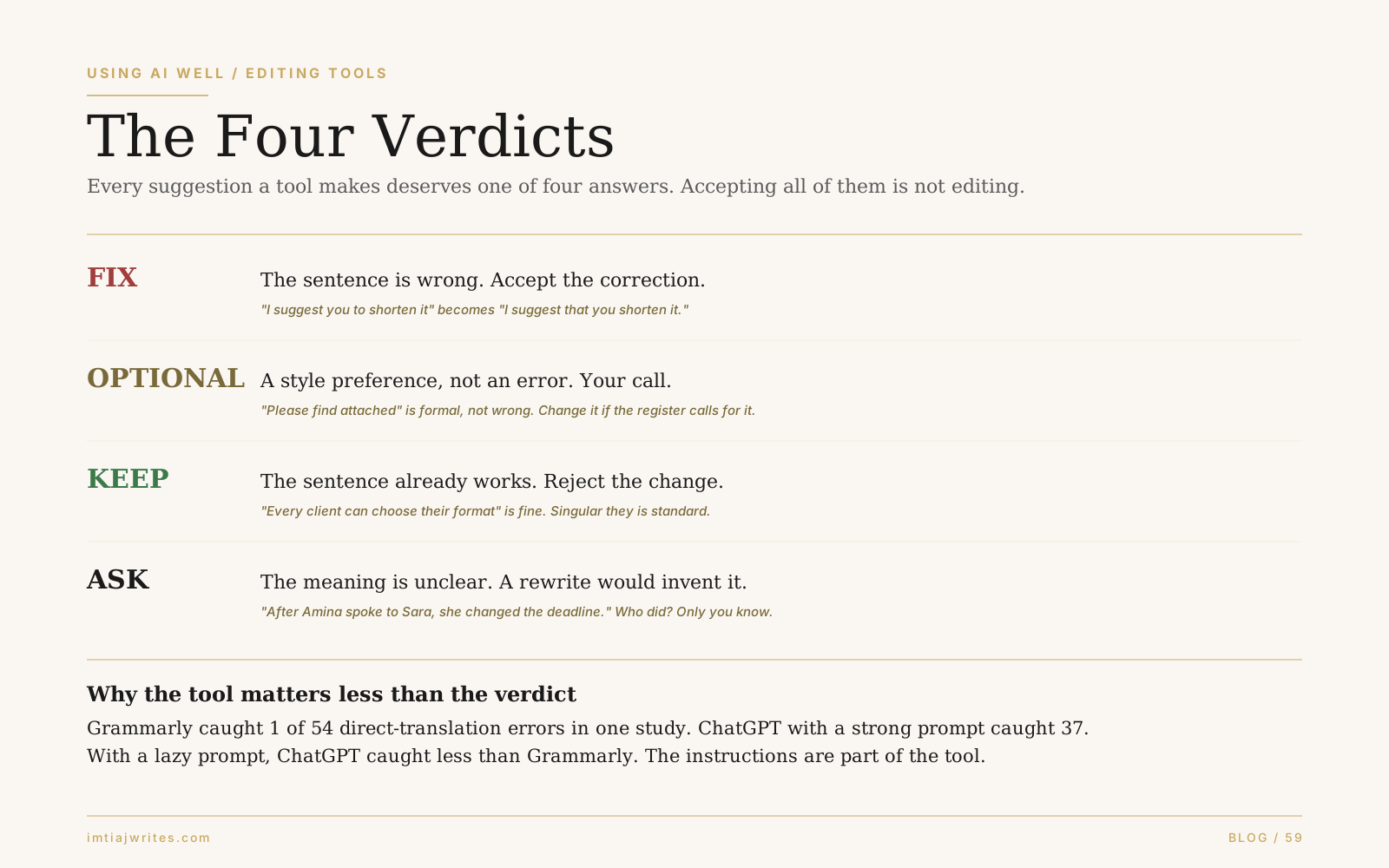
Every suggestion deserves one of four answers. Not accept or dismiss. Four.
FIX. The sentence is wrong. Accept the correction.
❌ I suggest you to shorten the introduction.
✅ I suggest that you shorten the introduction.
“Suggest” doesn’t take “you to.” That’s an error, not a preference, and the fix is right.
OPTIONAL. A style preference, not an error. Your call, based on register and reader.
❌ Please find attached the revised proposal.
✅ Here’s the revised proposal.
The first isn’t wrong. It’s formal. A tool flagging it as “wordy” is expressing a preference. In a casual email, the second is better. In a formal submission, the first may be exactly right. You decide, not the underline.
KEEP. The sentence already works. Reject the change, and notice that rejecting is a skill.
❌ Every client can choose his or her preferred format.
✅ Every client can choose their preferred format.
Singular “they” is standard, endorsed by MLA and most style guides. A tool that flags the second version and says the first is wrong, and you need enough confidence in your own English to say so. For non-native writers, this verdict is the hardest, because every correction feels authoritative. Sometimes the right edit is none.
ASK. The meaning is ambiguous, and any rewrite would invent it.
“After Amina spoke to Sara, she changed the deadline.” Who changed it? A tool that picks one silently has fabricated a fact. The correct response is a question back to you, and if a tool doesn’t ask, you have to catch it.
That fourth verdict is where the “may deliver on Friday” example lives. The tool didn’t see ambiguity. It saw a hedge and removed it. The meaning changed, and no underline told you.
The non-native writer’s task is not always to find a better sentence. Sometimes it’s to recognise the existing sentence is already right. That’s the distinction no accuracy score measures, and it’s the one that separates editing from obeying. It’s also the second pass of the two-pass edit: a judgment, not a rule.
The prompt that enforces the verdicts
Since the research shows the prompt is most of ChatGPT’s performance, here’s the one I’d use. It bakes in the four verdicts and the meaning safeguards.
Review this for [English variety], [audience], and [context]. Preserve my facts, terminology, certainty, conditions, deadlines, and voice.
Separate FIX changes from OPTIONAL style changes. Keep sentences that already work. If meaning is unclear, ASK instead of inventing it.
Give the smallest correction and a brief reason. Then show a version containing only the required fixes.
Two things it does that a bare “proofread this” doesn’t. It names the variety, because Grammarly documents separate settings for American, British, Canadian, Australian, and Indian English, and a spelling difference is not an error until you’ve said which English you’re writing. And it forbids silent meaning changes, which is the failure neither tool warns you about. For more prompts built on the same principle, the full set is in 15 ChatGPT prompts for non-native writers.
Two review questions worth asking of any correction, from either tool, when you’re not sure:
“Was my original sentence wrong, or are you recommending a style change?”
“What meaning changes between the two versions?”
If the answer to the second is anything other than “none,” you have a decision to make that the tool can’t make for you.
Pricing and one thing about client work
As of mid-September 2026: Grammarly Pro is $30 a month billed monthly, $60 a quarter, or $144 a year, which works out to $12 a month only on the annual commitment. ChatGPT Plus is $20 a month, and there’s a cheaper Go tier. Don’t compare $12 against $20 without noting one is a year’s commitment and the other is a month’s.
You don’t need both. Start with the task. If your errors are mostly mechanical, Grammarly’s free tier and your own two-pass read may be enough. If they’re mostly the translated layer, a trained ChatGPT with the prompt above will do more than any grammar checker. Buying both isn’t a requirement for serious non-native writers, whatever either company’s marketing implies.
And if you’re editing client copy, both services document controls over whether your content is used to improve their models. Check them before pasting unpublished client material. The setting doesn’t grant you permission to share a client’s work, but not checking it is a worse position to be in.
The honest limit
I’ve quoted one study heavily. It tested older models on student essays; it measured detection rather than correction quality, and it couldn’t see unnecessary edits. A June 2026 study in English Teaching & Learning found GPT-4 correcting 93% of textbook error sentences against Grammarly Premium’s 58%, but it excluded Grammarly’s generative features and scored against an answer key, so I’d treat that as another data point against “the specialist tool must be more accurate,” not as a current product verdict. Neither study tested what the products are today. Neither ran a non-native professional’s actual client draft through both.
So the durable takeaways are the structural ones. Grammarly is strong on the mechanical layer and weak on the translated layer. ChatGPT’s performance is mostly the prompt. Both will flatten your voice if you let them. And no accuracy percentage tells you the thing that matters most, which is whether the tool knew when to leave your sentence alone.
Four verdicts. Fix, optional, keep, ask. The tool proposes. You decide.
Frequently Asked Questions
Is Grammarly or ChatGPT better for non-native English writers?
It depends on which errors you make. In a 2025 study, Grammarly outperformed ChatGPT on mechanical errors like articles, prepositions, and spelling, but caught only 1 of 54 direct-translation errors while ChatGPT with a well-built prompt caught 37. If your writing is grammatically clean but sounds translated, a trained ChatGPT addresses the actual problem. If your errors are mechanical, Grammarly’s inline workflow is faster.
Does the prompt really change ChatGPT’s proofreading accuracy that much?
Yes, substantially. In the same study, ChatGPT detected 10% of errors with a generic prompt, 33% with a domain-specific one, and 55% with a one-shot prompt containing an example. With a lazy prompt, it underperformed Grammarly; with a specific one, it outperformed it. The instructions are effectively part of the tool.
Will Grammarly change my writing voice?
Its grammar and spelling corrections generally won’t. Its tone and fluency suggestions will, because they push every sentence toward a single neutral register. Use the mechanical corrections and ignore the style nudges, or your writing will start sounding like the tool rather than you.
Should I accept every suggestion an editing tool makes?
No. Sort each one into four verdicts: fix (a real error), optional (a style preference), keep (the sentence already works), or ask (the meaning is unclear and a rewrite would invent it). Accepting everything replaces your judgment with the tool’s defaults and can silently change what you promised, especially with hedges and conditions.
Do I need both Grammarly Pro and ChatGPT Plus?
No. Start from the errors you actually make. Mechanical errors suit Grammarly, and its free tier may be enough. Translated-sounding phrasing suits a trained ChatGPT with a constrained editing prompt. Compare prices on equal billing terms: Grammarly’s $12 a month requires an annual commitment, while ChatGPT Plus is $20 billed monthly.
Where to go next
👉🏼 For my full tool stack and what each one is for, see the AI writing tools I actually use.
👉🏼 For the prompts that make ChatGPT a disciplined editor, see 15 ChatGPT prompts for non-native writers.
👉🏼 For the pass where the four verdicts live, see the two-pass edit.
👉🏼 For the mechanical errors Grammarly is good at, see prepositions that mark you as non-native.
Fix, optional, keep, ask. The tool proposes. You decide.
