
Most “best AI writing tools” roundups are written by people who never opened the tools. They rank by affiliate commission, paraphrase the marketing pages, and give you a table you could have generated yourself. You can usually tell within two paragraphs, because nobody describes what it’s actually like to lose an afternoon fighting a tool that keeps overwriting your voice.
This is the other kind. I write professionally in English as my second language, for global brands and for this blog, and these are the tools in my actual working stack in 2026. Not the ones with the best landing pages. The ones I reach for, the ones I’ve stopped trusting, and the specific job I use each for. Where I criticize a tool, including the one I’m literally drafting this on, it’s my real verdict from real use.
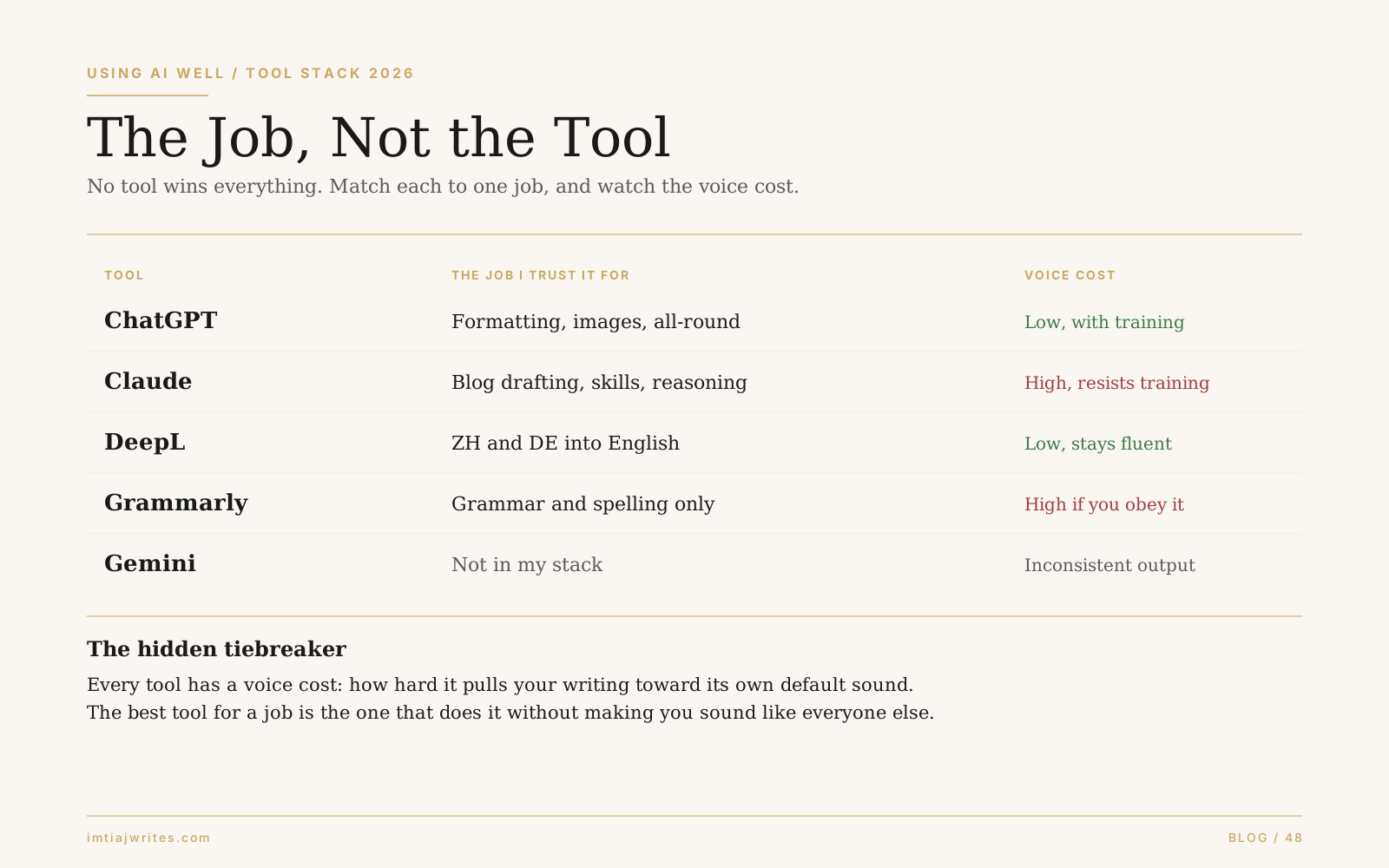
Here’s the rule the whole post runs on: no tool wins everything, so stop looking for the best one. Match each tool to the single job it’s genuinely good at, and pay attention to what I call the voice cost, which is the hidden thing that separates a tool that helps from one that quietly makes you sound like everyone else.
The rule: job, not tool
The mistake I see non-native writers make with AI writing tools is hunting for one winner, the single subscription that does everything. It doesn’t exist, and chasing it means you use one tool for jobs it’s bad at.
Every tool has one or two things it does better than the rest, and a voice cost attached to using it. Voice cost is how hard the tool pulls your writing toward its own default sound. A translator with low voice cost gives you fluent English that still sounds like your point. A rewriter with high voice cost gives you technically better sentences that no longer sound like you wrote them. For a non-native writer this is the whole game, because the entire goal is to sound like a competent version of yourself, not like a language model’s house style.
So I judge every tool on two axes: what one job is it best at, and what does it cost my voice to use it. Here’s my actual stack on both.
ChatGPT: the all-rounder I’d keep
If I could keep only one tool, it would be ChatGPT, not because it’s best at any single thing but because it’s the most reliable across the most jobs. I use it for formatting tasks and image creation, and as the general-purpose tool when I don’t want to switch apps.
Its voice cost is low, but with a catch: only after you train it hard. Out of the box it writes in the same flat, agreeable style everyone recognizes now. Invest real effort in feeding it your samples and correcting it, and it learns to preserve your voice better than anything else I use. The training is the price. Pay it, and it holds your voice across a wide range of work.
That combination, broad competence plus trainable voice, is why it wins my “keep one” test even though it’s not my favorite at any individual task.
Claude: the best drafting partner, with a voice problem
Claude is where I draft my personal blog writing, and its reasoning is the best in my stack. Its skills feature is genuinely differentiated: I run custom skills for SEO and GEO scoring that lift my search optimization directly, and a decision-making skill I use to brainstorm and surface angles I wouldn’t have reached alone. That last one is the thing no other tool in my stack does well. It doesn’t just answer, it helps me think.
But here’s my honest disappointment, and I’m not softening it because I’m writing this draft in Claude: no matter how hard I train it, it keeps sliding back into its own voice. ChatGPT learns my sound. Claude resists. You correct it, it complies for a few paragraphs, and then the default reasserts itself. For raw thinking and structure that’s fine, because I rewrite anyway. For anything where the output should sound like me with minimal editing, it’s a real limitation. Its token limits also make long drafting sessions frustrating in a way ChatGPT’s don’t.
High voice cost, best-in-class reasoning and skills. I keep it for what it thinks, not for how it writes.
DeepL: the only translator I trust
For moving text between languages, DeepL is the clear winner and it isn’t close. I use it for Chinese to English and German to English, and it produces genuinely fluent output instead of the literal, rigid, word-swapped result you get from Google Translate and most others.
This is the lowest voice-cost tool in my stack, because a good translation preserves your meaning and register instead of imposing its own. Where other translators give you technically correct English that screams “translated,” DeepL gives you English that reads like someone competent wrote it directly. For a non-native writer working across languages, that difference is worth the subscription on its own.
One honest limit: it’s a translator, not a writing partner. It moves your existing meaning across languages beautifully. It won’t improve a weak point, only carry it faithfully into the target language.
Grammarly: keep it on a tight leash
I use the paid version for one job only: catching grammar and spelling errors. For that, it’s reliable and fast.
But its voice cost is high if you let it off the leash, and this is the trap most non-native writers fall into. Grammarly doesn’t just flag errors. It suggests tone and fluency “improvements,” and those suggestions flatten your voice into a generic professional register. The danger is that its confident interface makes you feel like you should accept them, because it’s presenting your real voice as a mistake to be corrected.
I ignore every tonal and fluency suggestion it makes and accept only the hard grammar and spelling fixes. Used that way it’s valuable. Used the way it wants to be used, it’s a voice-flattening machine, which is exactly the failure mode I wrote about in the context of correctness-versus-naturalness in the two-pass edit. Grammarly is a Pass 1 tool. Never let it run Pass 2.
Gemini: the one I dropped
I don’t keep Gemini in my stack. In my use it was inconsistent, and the quality of reasoning felt a step below the others, enough that I stopped reaching for it. I’m keeping this short because a fair verdict on a tool I’ve stopped using shouldn’t pretend to more detail than I have. It didn’t earn a job in my rotation. Yours may differ, and tools improve, so test it yourself before taking my word as final.
What this means for your stack
Don’t copy my stack. Copy the method.
For each writing job you do regularly, ask which tool does that one job best, and what it costs your voice. You’ll likely land on something like this: a general-purpose model you’ve trained on your voice for drafting and odd jobs, a dedicated translator if you work across languages, and a grammar checker kept strictly to grammar. Three tools doing three jobs beats one tool doing all three badly.
And weigh voice cost as heavily as capability, because it’s the axis every affiliate roundup ignores and the one that actually matters for a non-native writer. A tool that writes cleaner English while erasing your voice hasn’t helped you. It’s made you sound like the tool. The entire project of writing well as a non-native professional is sounding like yourself, and any tool that works against that is the wrong tool no matter how good its output looks in isolation.
The reason I keep a personal voice through all of this is that I never let a tool run unsupervised on the parts that matter. If you want the method for getting AI help without surrendering your voice, that’s the voice-preservation approach in practice.
Pick the tool for the job. Watch the voice cost. That’s the whole system, and it survives every model update, which is more than any specific ranking can promise.
Frequently Asked Questions
What are the best AI writing tools for non-native writers in 2026?
There is no single best tool, because each is good at a different job. In practice a strong stack is a general-purpose model trained on your voice, such as ChatGPT, for drafting and general tasks; a dedicated translator like DeepL if you work across languages; and a grammar checker like Grammarly kept strictly to grammar. Match the tool to the job rather than looking for one winner.
Which AI tool preserves a writer’s voice best?
In this writer’s testing, a well-trained ChatGPT preserved voice best, though it requires significant effort feeding it samples and corrections first. Tools that rewrite for tone or fluency, like Grammarly’s style suggestions, tend to flatten voice the most. Voice preservation is the axis most tool reviews ignore and the one that matters most for non-native writers.
Is DeepL better than Google Translate for professional writing?
For the language pairs tested here, Chinese to English and German to English, DeepL produced noticeably more fluent, less literal output than Google Translate. It reads as though written directly in the target language rather than word-swapped, which makes it the stronger choice for professional work. It is a translator, though, not a writing improver.
Should I trust Grammarly’s suggestions?
Trust its grammar and spelling corrections. Be cautious with its tone and fluency suggestions, which tend to replace your voice with a generic professional register. Treating it as a grammar checker rather than a style editor keeps its value while avoiding the voice flattening.
Do I need to pay for AI writing tools?
Not necessarily, but paid tiers remove the limits that interrupt real work, such as usage caps and reduced features. Whether it is worth it depends on volume. A professional writing daily will feel free-tier limits quickly, while an occasional user may not need to upgrade.
Where to go next
👉🏼 For the editing method that keeps tools in their lane, see the two-pass edit.
👉🏼 For why tool-flattened writing sounds non-native, see unlearning school English.
👉🏼 For the false positives these tools can trigger, see the false positive problem.
👉🏼 For the underlying non-native patterns no tool fully fixes, see the three mistakes that mark non-native copy.
No tool wins everything. Pick each for one job, watch what it costs your voice, and stay the author of your own writing.
